

How to Pair a Roku Remote (Voice, Pro, and Simple Remotes)

How to pair a Roku remote depends on one thing you can check in five seconds: whether your remote has a pairing button. Roku voice remotes connect to the player over a wireless link and have to be paired before they'll do anything. Roku simple remotes are infrared, like an old TV remote, and never pair at all. Slide the battery cover off, look for a small button under the batteries, and you'll know which set of steps below applies to you.
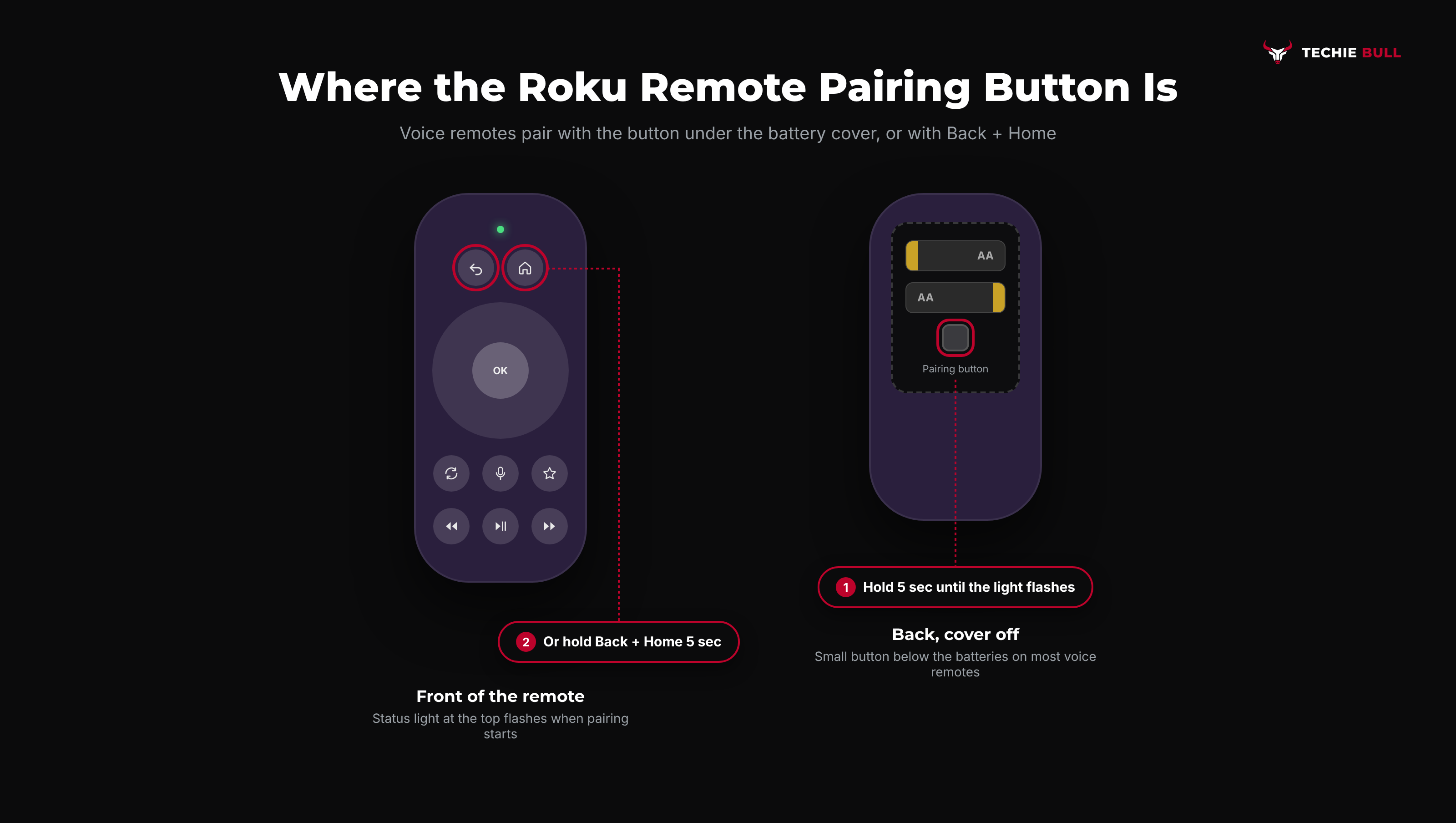
Quick answer: For a Roku voice remote, insert batteries, then press and hold the pairing button (inside the battery compartment or on the back) for 5 seconds until the status light starts flashing. Your TV will show a pairing message and confirm within about 30 seconds. No pairing button? Hold Back + Home together for 5 seconds instead. A simple remote with no pairing button and no voice button doesn't pair, it just needs batteries and a clear line of sight to the Roku.
Key takeaways:
- Voice remotes (the ones with a microphone or magnifying-glass button) need pairing. Simple IR remotes don't, and no amount of button-holding will "pair" them.
- The pairing button is usually under the battery cover. Hold it for 5 seconds until the light flashes, and keep the remote close to the Roku while it connects.
- No pairing button on your voice remote? Back + Home held together for 5 seconds does the same job.
- Adding a second remote, or pairing a replacement, is easiest from Settings > Remotes & devices using a remote or the Roku mobile app that already works.
- A 20-second Back + Home hold is a reset, not a pair. Don't mix the two up.
Prefer an interactive walkthrough? Try our Roku Remote Pairing Helper →
If your remote was working and has suddenly stopped, start with Roku Remote Not Working? Try This, which covers batteries, line of sight, and TV volume control in more depth. This guide is about getting a remote paired, whether it's brand new, a replacement, or a second one for the same box.
Which Roku Remote Do You Have?
| What you see on the remote | Remote type | Needs pairing? |
|---|---|---|
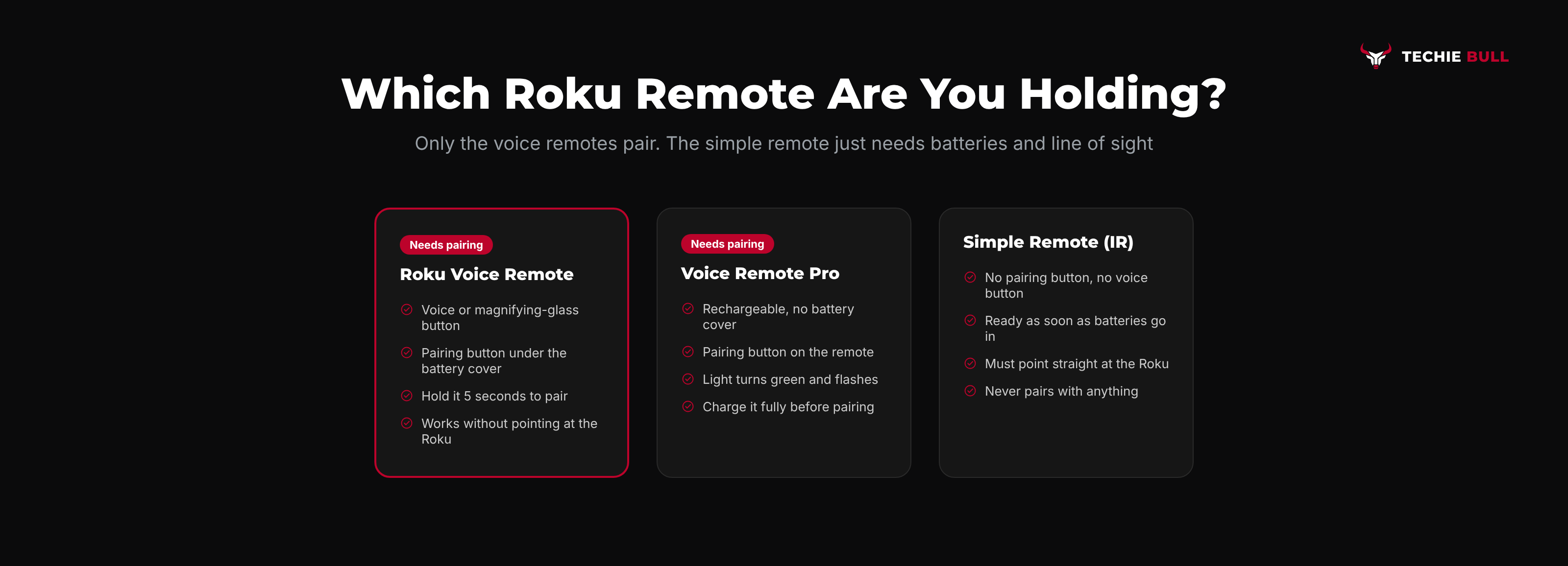
| Pairing button under the battery cover, microphone or magnifying-glass button | Roku Voice Remote | Yes |
| Rechargeable, no battery cover, microphone button, hands-free voice | Roku Voice Remote Pro | Yes (pairing button on the remote) |
| Voice button but no pairing button anywhere | Newer voice remote without a dedicated button | Yes, using Back + Home |
| No pairing button, no voice button | Roku Simple Remote (infrared) | No |
| Power and volume buttons on the side, came with a Roku TV | Roku TV remote (usually infrared) | Usually no |
That last row catches people out. Remotes bundled with Roku TVs (TCL, Hisense, and other brands running Roku OS) are often infrared, and an infrared Roku TV remote won't work with a separate Roku streaming stick, since they use different codes. If you're trying to use a Roku TV's remote with a Roku Express on another TV, that's the mismatch, not a pairing failure.
Why Voice Remotes Need Pairing in the First Place
A simple remote fires infrared light at the front of the Roku, so it has to be pointed straight at it. Voice remotes use a wireless radio link instead, which is why they work through a cabinet door or from the other side of the room. The trade-off is that the remote and the player have to be introduced to each other first, and that introduction can be lost after a battery swap, a power cut, or a software update. Re-pairing is normal maintenance, not a sign the remote is failing.
Method 1: Pair With the Pairing Button (Most Voice Remotes)
This is the standard route, and the one Roku's own setup guide describes.
Step 1: Power On the Roku and Wait for the Home Screen
Turn on your TV and Roku and wait until the Home screen loads. If this is a brand new setup, the Roku will usually sit on a "pair your remote" screen and wait for you, which saves a step.
Step 2: Put Fresh Batteries In
Remove the battery cover, insert the batteries, and check the direction of each one against the markings in the compartment. Weak batteries are the most common reason pairing silently fails, since the remote needs more power to pair than it does to change channels. Leave the cover off for now so you can reach the pairing button.
Step 3: Hold the Pairing Button for 5 Seconds
Press and hold the pairing button until the status light on the front of the remote starts flashing. On the Roku Voice Remote Pro, Roku's guide notes the light turns green and flashes. Let go once it's flashing.
Step 4: Keep the Remote Close and Wait
Hold the remote near the Roku player or Roku TV. Within about 30 seconds the TV should show a message that the remote is pairing, then a confirmation once it's done. Some remotes then walk you through setting up TV power and volume control. Follow those prompts, or skip them and come back later.
I keep a spare pair of AA batteries taped inside the cupboard under my TV for exactly this moment. Pairing a remote on half-dead batteries is the single most annoying five minutes in home tech.
Method 2: Pair Without a Pairing Button (Back + Home)
Some newer Roku voice remotes don't have a dedicated pairing button. Roku's fallback is a button combination.
- Make sure the Roku is on and showing the Home screen.
- Press and hold Back and Home at the same time for 5 seconds.
- Release when the status light starts flashing.
- Keep the remote close to the Roku and wait for the on-screen pairing confirmation.
Watch the timing. Holding those same two buttons for 20 seconds resets the remote instead of pairing it. That's a useful step if pairing keeps failing (reset first, then do the 5-second pair), but it isn't the pair itself.
Method 3: Pair From the Roku Settings Menu
If you're adding a second remote, or pairing a replacement while the old one still works, start from the menu. You can drive these screens with the old remote or with the free Roku mobile app.
Step 1: Open Remotes & Devices
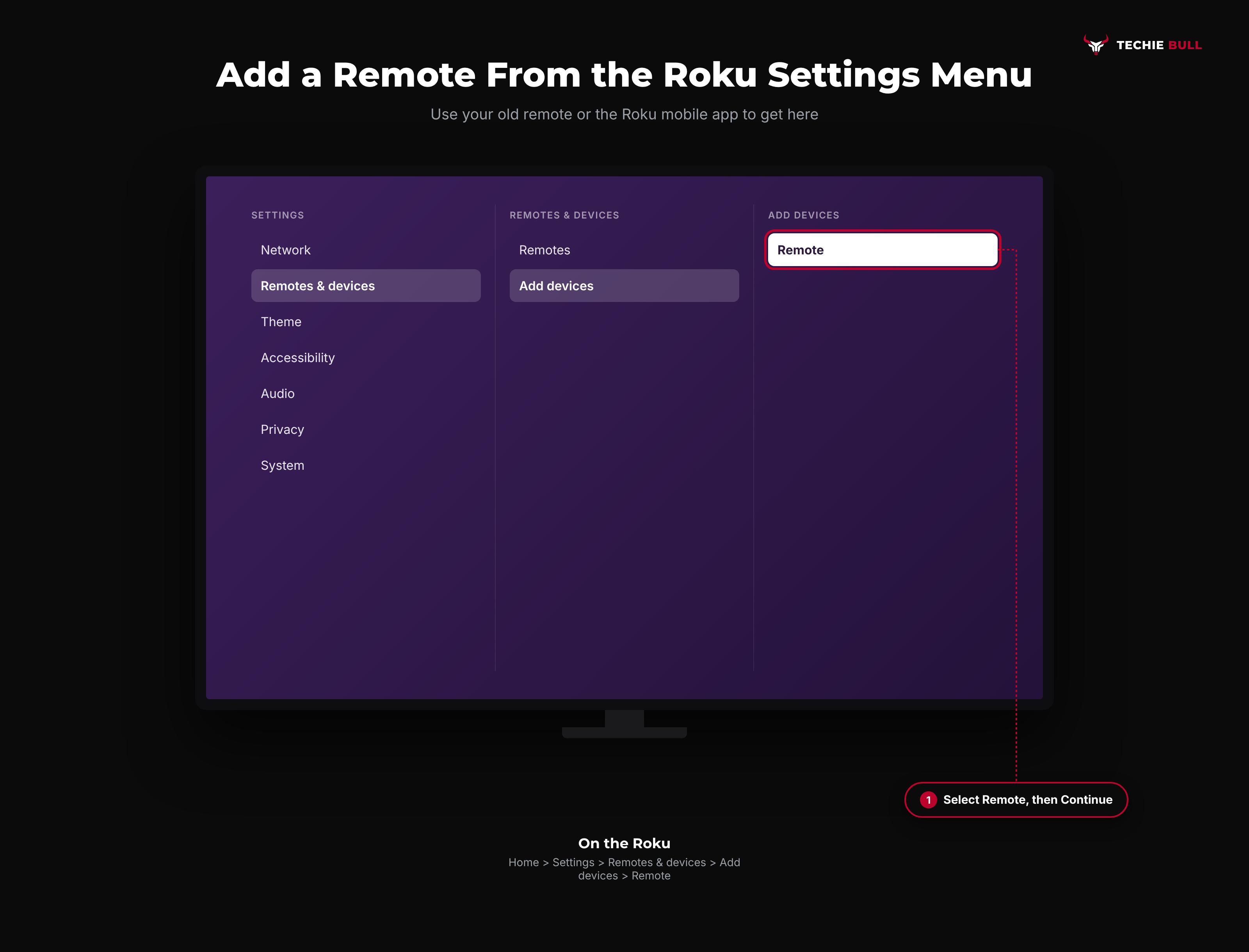
Press Home and go to Settings > Remotes & devices.
Step 2: Choose to Add a Remote
Select Add devices (some software versions word it as Pair new device or Add remote), then choose Remote and select Continue.
Step 3: Put the New Remote Into Pairing Mode
When the screen asks, hold the new remote's pairing button (or Back + Home) for 5 seconds until its light flashes. The Roku confirms when the new remote is paired.
A Roku player can have more than one remote paired at once, so you don't need to unpair the old one first. If you've got two Rokus in the same room, unplug the one you're not pairing so the remote can't latch onto the wrong box.
Method 4: Pair During a Restart (When No Remote Works at All)
If you've got no working remote and no phone app set up, a restart puts the Roku into its "looking for a remote" state on its own.
- Unplug the Roku player, or the Roku TV, from the wall.
- Wait at least 5 seconds, then plug it back in.
- As soon as the Home screen appears, hold the pairing button (or Back + Home) on the remote for 5 seconds.
Doing these close together matters. A remote that starts pairing after the Roku has finished looking won't connect, so if the first attempt fails, restart and try again with tighter timing.
Setting Up a Simple (IR) Remote
There's nothing to pair here, which is the good news. Roku's own support page says a simple remote is ready to use as soon as you put batteries in or pull the plastic battery tab.
If it doesn't respond:
- Point it straight at the Roku. Infrared needs a clear line of sight to the front of the player. A Roku Stick tucked behind the TV won't see a simple remote at all.
- Check the remote is firing. Point your phone's camera at the remote's tip and press a button. If you see a faint flashing light on the phone screen, the remote is sending a signal and the problem is line of sight.
- Check it's the right remote. A Roku TV's IR remote won't control a separate Roku streaming player.
If Pairing Keeps Failing
Work through these in order. Most stubborn cases clear up by the second or third item.
- Swap in brand new batteries, not ones from the drawer. For a rechargeable Voice Remote Pro, charge it properly first.
- Reset the remote: hold Back + Home for 20 seconds until the light stops, then do the normal 5-second pair.
- Restart the Roku (unplug for 5 seconds) and pair immediately after the Home screen appears.
- Move the remote right next to the Roku while pairing, and move cordless phones, wireless keyboards, or other 2.4GHz gadgets away.
- Update the Roku's software from Settings > System > System update, using the Roku mobile app to get there if your remote isn't cooperating.
- Check compatibility. Most Roku voice remotes work with most current Roku players and Roku TVs, but older Roku models may not support the newest remotes. Roku's support site lists which remotes work with which devices.
Still Not Working?
If a fresh set of batteries, a reset, and a restart-then-pair still won't get the light flashing or the TV to confirm, the remote itself may be faulty. Roku's support site has the official pairing guide and a remote compatibility checker, and Roku TV owners can also check with their TV maker's support, since the TV brand handles warranty for the bundled remote. In the meantime, the Roku mobile app works as a full remote over your Wi-Fi.
Frequently Asked Questions
Where is the pairing button on a Roku remote?
On most Roku voice remotes it's a small button inside the battery compartment, below the batteries. On the rechargeable Voice Remote Pro it's on the remote itself rather than under a cover. If you can't find one anywhere, your remote either uses Back + Home for pairing (if it has a voice button) or it's a simple IR remote that doesn't pair.
Can I pair a Roku remote without the pairing button?
Yes. Hold Back and Home together for 5 seconds until the status light flashes, with the Roku on and showing the Home screen. If you're adding a remote through the menu, the same combination works when the screen asks you to start pairing.
Can I pair two remotes to one Roku?
Yes. Go to Settings > Remotes & devices and add the second remote while the first still works. Both remotes stay paired and either can control the Roku.
Why does my Roku remote's light flash but never pair?
Usually low batteries, the remote being too far from the Roku, or the Roku not actively looking for a remote. Put in fresh batteries, restart the Roku, and hold the pairing button right after the Home screen appears, with the remote close to the player.
Will a Roku TV remote work with my Roku streaming stick?
Usually not. Roku TV remotes are mostly infrared and use different codes from Roku streaming players. You'll need a remote made for players, or the Roku mobile app.
Quick Summary
Check for a pairing button first. If your Roku remote has one, insert fresh batteries and hold it for 5 seconds until the light flashes, with the remote close to the Roku, and the TV will confirm the pair. No button but a voice key means Back + Home for 5 seconds does the same thing. Adding a second or replacement remote is easiest through Settings > Remotes & devices > Add devices > Remote. A simple IR remote never pairs at all: give it batteries and a clear view of the Roku. And if pairing keeps failing, new batteries, a 20-second reset, and a restart-then-pair fix almost everything.
Related Articles
How to Connect a Firestick Remote to Your TV (Pair + TV Control)
How to connect a Firestick remote to your TV: pair it to the Fire TV Stick with a 10-second Home hold, then set it up to run your TV's power and volume.
LG TV Won't Connect to Wi-Fi? 9 Fixes That Actually Work
LG TV won't connect to Wi-Fi? Run LG's hotspot test to find whether the TV or router is at fault, then fix it with power cycling, Quick Start+, DNS, and more.
Screen Mirroring iPhone to Samsung TV (AirPlay Setup Guide)
How to screen mirror your iPhone to a Samsung TV with AirPlay: turn on Apple AirPlay Settings on the TV, mirror from Control Center, and fix a missing TV.